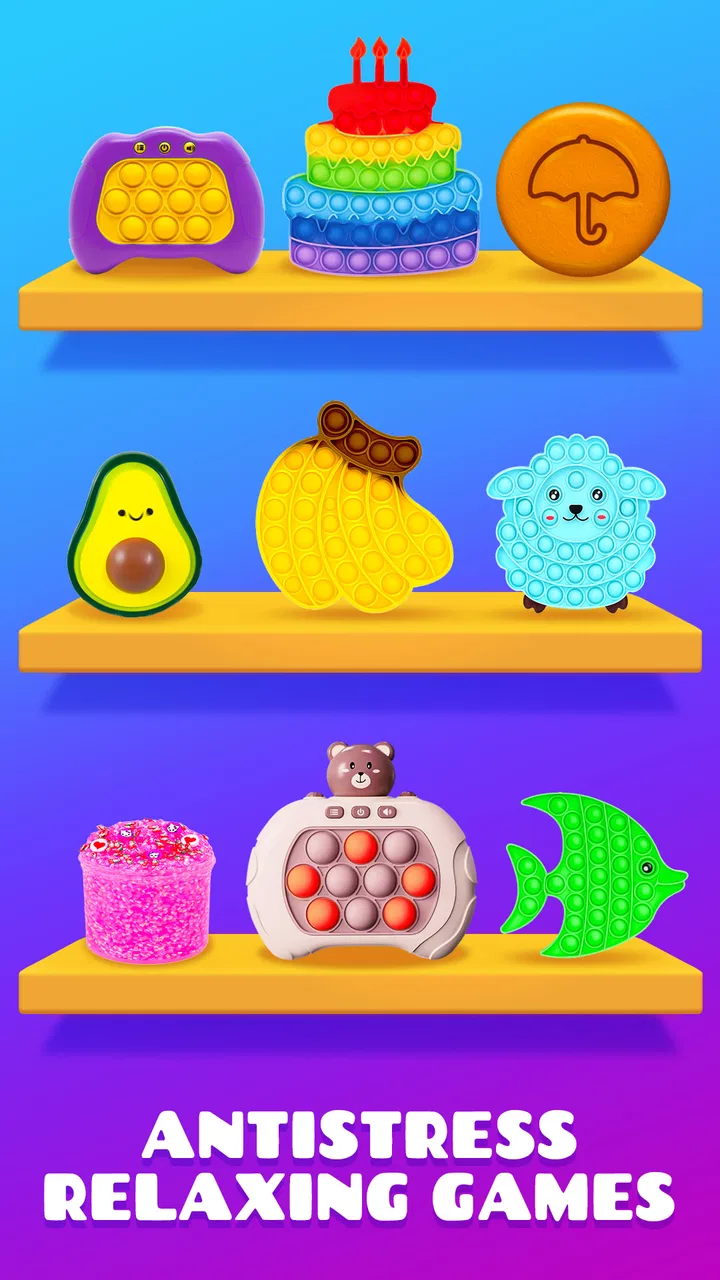
Antistress Relax Fidget Games
- 4.4
- Rating
- 10.00M
- Installs
- Free
- Price

 Analysis by App-foxy
I tried Antistress Relax Fidget Games as a quick entertainment app rather than expecting it to replace a serious meditation tool. That distinction matters. It is built around short sensory activities, simple fidget-style interactions, and “pop it” play intended to help you pause when your mind feels busy. My first impression was that it understands a very common situation: you have a few spare minutes, you want something gentle to do with your hands, and you do not want to learn a complicated system first.
Developed by DobroApps, this free Android app sits in the entertainment category and is suitable for Everyone. It has reached over ten million installs, with an average rating of 4.4 from around fifty thousand ratings and roughly twelve hundred written reviews. Those figures suggest that the basic idea has connected with a broad audience, but they do not tell you whether it will suit your particular kind of stress. After using it, I would describe it as a collection of small tactile distractions: useful for a short reset, less convincing if you are looking for structured relaxation or long-term mental-health guidance.
What the app feels like in everyday use
The central appeal is immediate interaction. Instead of reading instructions, setting up a profile, or following a long exercise, I can open a mini-game and start tapping, pressing, or playing with the available sensory activity. That low entry barrier is one of its strongest qualities. When I am waiting for an appointment, winding down after a noisy day, or trying not to reach for social media automatically, a small interactive task can be easier to begin than a breathing session.
You May Also Like

 Blood Strike: 2.5 Anniversary
Blood Strike’s Loadouts Turn Every Drop Into a Tactical Gamble
A close look at Blood Strike’s custom loadouts: how fast access to signature weapons reshapes its battle royale rhythm, rewards preparation, and narrows the gap between fights.

 Pandora - Music & Podcasts
Pandora’s Music Is Easy to Start, but Harder to Recover
Pandora’s strength is its low-effort path from a seed to a station. Its weak spot is how much confidence it asks you to place in connection, setup, and quiet recovery.

 8 Ball Pool
 Is Built on Rivalries, Rematches, and Routine
A close look at the rivalries, rematches, shared routines, and unanswered safety questions that turn a quick pool match into a persistent mobile community.

 Samsung Music
’s Quiet Strength Is Playing What You Already Own
Its reach comes less from spectacle than from dependable access to a personal library. That simplicity is both the app’s strongest retention engine and its ceiling.

 AccuWeather: Weather Radar
AccuWeather Review: A Quick, Clear Forecast for Everyday Decisions
For everyday plans, the best forecast is the one you can understand quickly. AccuWeather makes rain timing, radar, and local conditions easy to act on, with a few trade-offs.

 Hill Climb Racing
Why Hill Climb Racing Still Turns Crashes Into One More Run
A tiny car, a bumpy hill and one more upgrade: Hill Climb Racing keeps resurfacing because its simple chaos makes every near-miss feel personal.
More From Our News Desk
View All News


The experience is intentionally lightweight. The activities are not designed around a story, competition, or demanding objective. Their value comes from repetition and attention: I focus on a small action, notice the response, and let a few minutes pass without adding another stream of information to my head. This makes the app more approachable than many wellness products that immediately ask me to choose a program, track a mood, or commit to a routine.
That simplicity also defines the limit. If you need a clear progression from beginner exercises to deeper relaxation, you may find the collection shallow. I did not come away with a method I could practice away from the screen. The app is better understood as a pocket distraction with a calming theme than as a complete stress-management plan.
Why the short-session design works
One useful way to use it is to set a personal stopping point before opening an activity. I might decide to play during a short break and then put the phone down when the break ends. Without that boundary, a collection of easy mini-games can become another way to fill time rather than a deliberate pause. The app gives me something to do, but I still have to decide whether the activity is helping me feel settled or merely keeping me occupied.
I also found that different moments call for different kinds of interaction. When I feel restless, repetitive tapping gives my attention a simple target. When I am mentally tired, a more visually gentle activity is preferable to anything that feels like a challenge. The practical insight is not to treat every mini-game as equally relaxing. Try several, notice which ones reduce agitation rather than increase it, and return to those instead of automatically choosing the newest option.
For children, the Everyone rating makes the app approachable from an age-classification perspective, but I would still treat it as screen entertainment rather than an automatic solution to frustration or overstimulation. A parent may want to try the activities first, check how the device presents them, and decide whether the interaction fits the child’s habits. An age rating is useful context, not a substitute for supervision or family rules.
Controls, visibility, and trust while using it
My trust in an app like this comes less from its relaxing label and more from what I can actually see and control. Antistress Relax Fidget Games is easy to approach because its purpose is clear on the surface: open it, choose an activity, and interact. That visible simplicity is reassuring compared with entertainment apps that hide their main function behind accounts, elaborate onboarding, or social features.
At the same time, I would not assume that a simple interface automatically means a simple data experience. Before installing or updating, I recommend checking the current permission prompts and the privacy information presented through the platform. Permissions can change over time, and the safest review habit is to judge the choices shown on your own device rather than rely on assumptions about what a relaxation app must or must not collect.
The same applies to notifications. If the app offers notification choices during setup or in its settings, I would leave them off unless reminders genuinely help me. A tool meant to reduce digital noise should not become another source of interruptions. Choosing fewer alerts is a small but meaningful way to keep the app in a supporting role.
There is no reason to create extra commitments just to test a few tactile activities. If an account is optional, I would avoid making one for a short trial. If the app presents a required sign-in, I would read what is being requested and decide whether that exchange is worthwhile for this type of entertainment. The principle is simple: use only the controls and access that serve your actual purpose.
Free access and the point where costs matter
The app is free to download and use, which makes experimenting with it relatively easy. It also includes in-app purchases priced from $2.99 to $3.99 per item. That range is not automatically a problem, but it changes the way I approach the app. I would explore the free experience first, identify whether the basic activities are genuinely useful, and only then consider whether an individual purchase adds enough value.
This is especially important because the app’s benefit is subjective and often brief. Paying for an extra activity may make sense if it becomes part of a regular, intentional routine. It makes less sense if I am buying in a moment of frustration simply because I want more novelty. I prefer to pause at the purchase screen, read exactly what is included, and confirm that the transaction is made through the platform’s normal purchase controls.
For families, purchase protection is worth considering before handing the phone to a child. A tactile game can feel harmless, but easy access to optional items can still lead to accidental spending. The practical safeguard is to use the device’s purchase authentication and family controls, then explain that free play and paid additions are separate choices.
How I would use it without letting it become another habit
My favorite workflow is deliberately small. I open the app when I notice a specific need, choose one activity, and use it for a short break rather than leaving it open in the background. Afterward, I switch to the next real task: returning to work, putting the phone away, or continuing my evening routine. This makes the app a transition tool instead of a destination.
A second useful workflow is pairing it with a physical change. I might use a fidget activity while sitting at my desk, then stand up and stretch when I finish. The digital interaction handles the first minute of restlessness, while the movement prevents me from confusing screen time with complete recovery. This combination is more effective for me than repeatedly opening different activities and hoping one will solve the whole mood.
I would also avoid using it as my only response to serious or persistent distress. The app can offer a momentary diversion, but it does not replace professional support, a trusted conversation, sleep, movement, or practical changes to an overwhelming situation. If tapping and popping only postpones the same problem, that is a sign to look beyond the app rather than search endlessly for a better mini-game.
Comparison with familiar alternatives
Compared with a traditional meditation app, this one asks for less patience. Meditation usually requires me to sit with instructions, silence, or a guided voice. Antistress Relax Fidget Games gives my hands a task, so it may suit people who become more distracted when they are told to do nothing. The trade-off is that it offers less structure and less opportunity to learn a technique that works without a phone.
Compared with a physical fidget toy, the app is more portable in one sense because it is already on a device I may be carrying. It can provide variety rather than one repeated texture or movement. The disadvantage is obvious: I still have a glowing screen in front of me, and the phone also contains messages, videos, and other distractions. A real fidget object may be the better choice during meetings, bedtime, or any situation where reducing screen exposure is the main goal.
Compared with casual puzzle games, these activities feel less achievement-driven. That can be helpful when I do not want scores, timers, or failure states. On the other hand, someone who relaxes through goals and progression may prefer a puzzle game with a clear sense of completion. This app is strongest when the action itself is enough; it is weaker for users who need depth, challenge, or a long-term reason to return.
Compared with a plain “pop it” toy app, the broader collection gives me more ways to find a comfortable interaction. That variety is useful, but it can also encourage browsing. I get the best result when I choose quickly and play, rather than treating the menu as another feed to scroll through.
Device support and practical expectations
The current version is 1.9.2, and the app supports Android 7.0 and newer. That gives it a fairly broad reach for Android users, including people who are not using the latest phone. Still, compatibility is not the same as identical performance on every device. Older hardware may handle animations differently, and the feel of tapping depends on the screen, sound settings, and the way each person responds to visual feedback.
I would test it on the device where I actually expect to use it, especially if that device is shared with family members or used during quiet hours. Lowering media volume may be important if the app includes sounds that feel stimulating rather than calming. Likewise, a darker or less bright screen setting can make the experience more comfortable at night, although those adjustments come from the phone rather than from any special promise made by the app.
Another practical question is whether you want relaxation content available offline or whether you are comfortable with the app’s normal connection behavior. I would check how it behaves in airplane mode before relying on it during travel. That small test tells me more about whether it fits a particular routine than assuming every mini-game will always be available without a connection.
Who will get the most from it
I think it is a good match for someone who wants a low-pressure sensory break, dislikes formal meditation, and prefers interacting with something rather than watching a video. It can also suit people who need a harmless alternative to repeatedly refreshing social feeds during short periods of boredom. The free entry point makes it easy to try without committing to a subscription-style wellness program.
It may be particularly useful for a desk worker who notices restless hands during a difficult task. A brief session can create a clean boundary between “I am stuck” and “I am ready to try again.” The key is to use it as a reset with an ending, not as a way to avoid the task indefinitely.
I would be more cautious recommending it to someone seeking clinically informed anxiety support, sleep treatment, guided mindfulness, or measurable habit building. It is also not my first choice for a person who is trying to reduce phone use. In that case, a physical fidget item, a short walk, or an audio-only relaxation practice may better match the goal.
My cautious verdict
Antistress Relax Fidget Games succeeds because it does not make a small need feel complicated. I can open it, choose a sensory activity, and give my attention a simple place to land. DobroApps has made an entertainment app that is approachable, free to start, and broad enough to appeal to people who enjoy tapping and fidget-style play.
My recommendation comes with clear boundaries. I would check permissions and privacy choices directly on the device, keep notifications and optional access limited to what I need, and explore the free content before considering the paid items. I would also avoid presenting it as a treatment or expecting a collection of mini-games to create lasting calm by itself.
For a few spare minutes, it is a pleasant tool. For a complete relaxation system, it is not enough. Its real strength is controlled, low-pressure distraction: when I use it intentionally and stop when the break is over, it earns a place among my casual entertainment apps. When I need deeper support, less screen exposure, or a structured practice, I would choose a different option.
FAQs for Antistress Relax Fidget Games
01What is Antistress Relax Fidget Games, and how does it work?
Antistress Relax Fidget Games is a mobile app designed to help users alleviate stress and anxiety through interactive fidget toys and calming activities. The app features a variety of virtual fidget toys, such as spinners, squishies, and bubble wrap, allowing users to engage in sensory experiences that promote relaxation and focus. Simply select a toy, interact with it on your screen, and enjoy the soothing effects.
02Is Antistress Relax Fidget Games suitable for all age groups?
Yes, Antistress Relax Fidget Games is suitable for all age groups. The app is designed to be family-friendly, providing a safe and engaging environment for both children and adults. The simple, intuitive interface makes it easy for users of all ages to navigate and enjoy the various activities aimed at promoting relaxation and mindfulness.
03Does the app require an internet connection to function?
Antistress Relax Fidget Games does not require an internet connection to function, making it a convenient option for on-the-go relaxation. Once the app is downloaded, users can access all features offline, allowing them to use the app anytime and anywhere without worrying about data usage or connectivity issues.
04Are there any in-app purchases or ads in Antistress Relax Fidget Games?
The app is free to download and offers a selection of complimentary activities. However, it does include in-app purchases for unlocking additional features and content. Additionally, users may encounter ads while using the app. These can be removed by purchasing the ad-free version, enhancing the overall user experience.
05Can Antistress Relax Fidget Games genuinely help in reducing stress?
While Antistress Relax Fidget Games is not a substitute for professional mental health treatment, it can serve as a helpful tool for temporary stress relief. The tactile and interactive nature of the app's activities can provide a distraction from daily stressors, promoting a sense of calm and focus through engaging sensory experiences.
Pros
- Wide variety of calming games.
- Simple
- intuitive user interface.
- Regular updates with new content.
- No complex tutorials needed.
- Low battery consumption.
Cons
- Contains in-app ads.
- Limited free content access.
- No offline mode available.
- Some games lack depth.
- Occasional app crashes.

Antistress Relax Fidget Games
Gallery